What to look for in training management software: a buyer’s guide

The right training management software should make it easier to organize your programs, coordinate instructors, and deliver consistent, high-quality learning experiences.
But the exact features you need will depend on how your training team operates, the kind of training you are designing and delivering, and the biggest challenges you're facing with your current solution.
This guide covers the key features to look for in training management software, what to consider when evaluating costs, and how to choose a system that fits your organization's needs.
What to look for in training management software
The best training management software isn’t necessarily the platform with the longest feature list. It’s the one that supports the way your organization plans, coordinates, and delivers training while fitting neatly into your existing tech stack.
Implementing a new training management tool, integrating with an LMS or simply onboarding your team all takes time. Before you take the plunge and commit to a training platform, here are seven areas worth evaluating.
1. Training requests and program management
For many internal L&D teams, training starts with a request rather than an established course schedule.
These requests often arrive through different channels, making it difficult to maintain an overview of upcoming work, prioritize requests, and allocate resources. In some cases, this is the trigger for an L&D team to start looking for a TMS: the work of managing and clarifying requests can create an admin overhead that falls onto training managers.
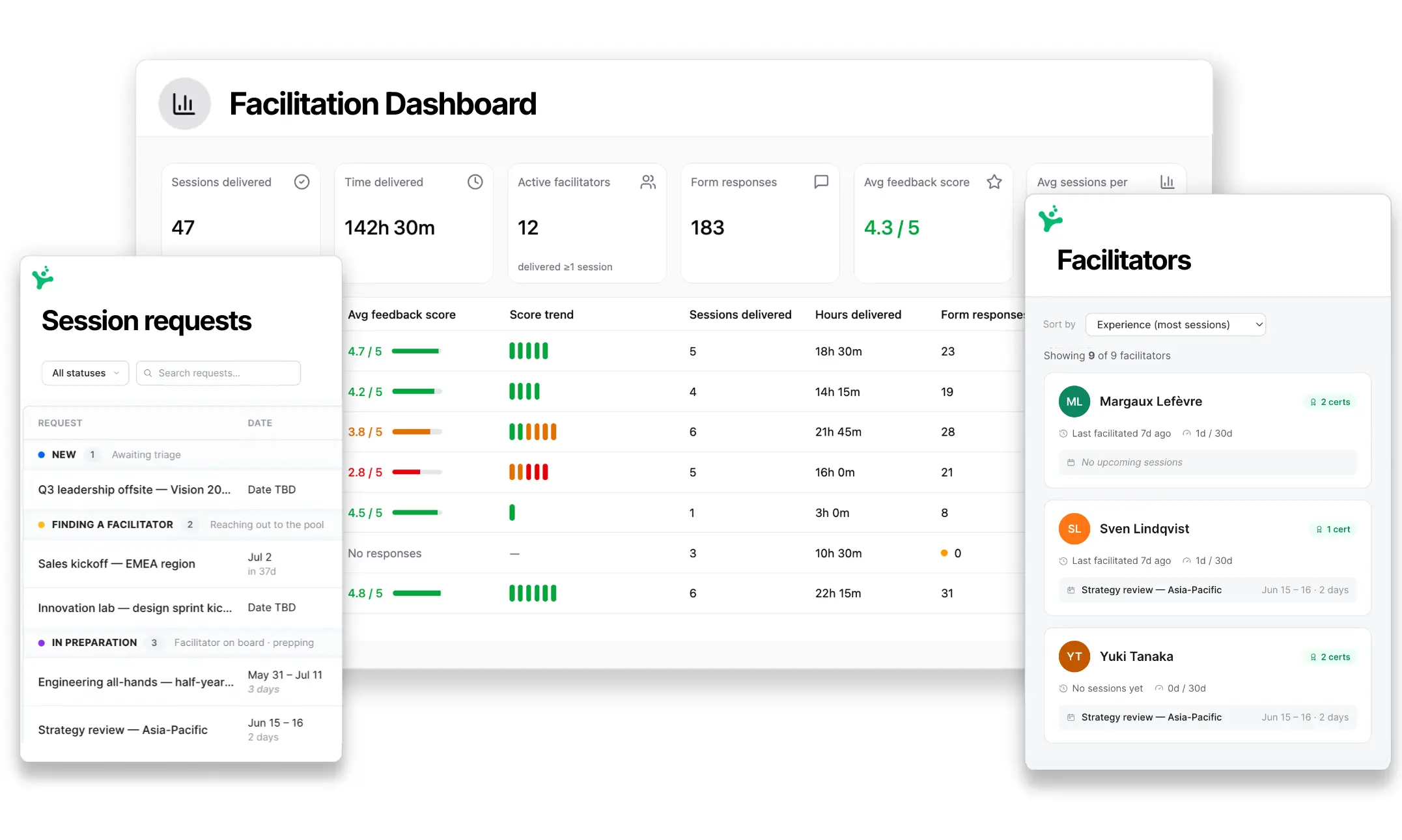
Look for a system that can collect training requests, capture requirements, assign responsibility, and track progress from planning to delivery.
If the system allows stakeholders to submit a request through a standardized form that helps clarify the training need and then place it into a structured workflow, this can speed up the training design process and improve the quality of everything that comes after.
For commercial training providers, the equivalent priority may be managing course bookings, registrations, and customer inquiries.
Questions to consider:
- Can stakeholders submit training requests through a standardized process? How do they submit a request?
- Can training managers see which requests are new, approved, scheduled, or completed?
- Can we track the work involved in preparing and delivering each program?
- How and when are teams able to clarify requests and understand core training needs? What features exist to support this process?

2. Scheduling and resource management
Scheduling sessions and managing trainer capacity becomes more complicated as the number of sessions, instructors, and locations increases.
A good training management system should help you maintain a clear training calendar, manage capacity, identify scheduling conflicts, and make changes without creating unnecessary manual work.
When reviewing software, it’s worth testing what happens when plans change and things need to be adjusted on the fly, not just how easily you can schedule a new session.
How does the system alert you to issues and how easy is it to find another, properly accredited trainer at short notice?
This is a good time to consider what parts of your tech stack will handle learner enrolment and track learner progress. Often, a HR platform, LXP or LMS is the place where learner pathways are handled, while the TMS is where the admin, organization and design work behind a training program happens.
Questions to consider:
- Can we see instructor and resource availability in one place?
- Does the system identify scheduling conflicts before they happen?
- How easy is it to reschedule a session and communicate changes?
- Can we manage registrations and attendance without relying on separate spreadsheets? Or is this handled by our LMS?
- How easy is it to overview all the work happening in L&D?
3. Facilitator and instructor coordination
For organizations delivering training through a large pool of instructors, finding the right person for each session can be one of the biggest operational challenges.
You may have facilitators and trainers with different qualifications, specializations, languages, locations, and availability.
A leadership development workshop might require an experienced coach, while a technical training session needs someone with a particular certification.
Look for training software that lets you maintain detailed facilitator profiles, identify suitable instructors, manage invitations and assignments, and track who is delivering what. This becomes particularly important when your programs are delivered by a mix of internal facilitators, external trainers, and subject matter experts.
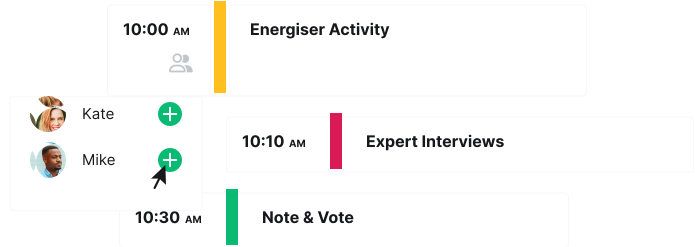
Many training management tools also feature an instructor portal where trainers can review assigned work, raise their hands for jobs and access training materials too.
Questions to consider:
- Can we find trainer based on skills, qualifications, location, and availability?
- Can we manage invitations and confirmations without relying on long email threads?
- How quickly can we identify and assign a replacement instructor?
- What parts of the assignment workflow can the system automate?

4. Training design and content consistency
Scheduling an instructor is only part of delivering effective training.
You also need to ensure that trainers have access to high-quality facilitator guides and training materials that give them what they need while also ensuring best practices are maintained. This is particularly important when an L&D team is scaling and programs are delivered across multiple locations and trainers.
Training managers need to know that desired training outcomes will be reached every time a session is run and that each participant receives the same high-quality training. A repository of training guides, organized in one place is one way of achieving this.
For example, when Norconsult delivers leadership development programs across different offices, it uses a core agenda that trainers can adapt to local schedules and requirements. This creates a balance between achieving consistency and improving quality.
When exploring tools, look for reusable training templates and shared material libraries but also consider where the design of those materials is happening. Where can SMEs and trainers come together and collaborate on program agendas and facilitator guides?
Questions to consider:
- Can instructors access and reuse approved training agendas and materials?
- Can SMEs and trainers collaborate on a program or training design?
- Can we update a standard program without rebuilding every session from scratch?
5. Integrations and training delivery
Most training teams already use several tools to support their programs. These might include a learning management system (LMS) for learner records, Microsoft Teams or Zoom for virtual delivery, and HR or CRM systems for managing employee or customer information.
Your training management software should fit into this existing workflow rather than creating another disconnected source of information. When considering tools, consider the primary place your L&D team will be working and what information needs to be present in each place. What does your training mix look like and what elements are most important?
If you’re working with a lot of virtual instructor-led training, consider how the platform handles meeting links, participant communications, and integrations with your preferred delivery tools.
One final word on integrations: not every bit of data needs to be present in every single place. When choosing a tool, come back to your core needs and the pain points you’re trying to solve for your L&D team. Sometimes, the right tool is the one that solves that issue but may not integrate with every part of your stack. It’s about finding a balance:
Questions to consider:
- Does the software integrate with our existing LMS, calendar, and virtual delivery tools?
- What information do we really need to be present in each tool?
- Can we share training information without repeatedly exporting and importing data?
- Which administrative tasks still require manual work between systems?
6. Reporting, feedback, and training impact
Once training has been delivered, your team needs to understand what happened and what can be improved.
Basic reporting should help you see how many sessions were delivered, who attended, and which instructors were involved. But this is the bare minimum. It tells you that training happened but not whether it had any impact or what can be improved.
Consider whether the software supports the entire evaluation process, from collecting participant feedback to reviewing outcomes and identifying improvements. Can this happen within the tool and does it feature any dashboards or analytics to help your team interpret this data?
In today’s landscape, any software purchase needs to show ROI and give the team confidence in using it. Robust reporting and feedback flows can be easily overlooked but can be the missing link between monitoring and actually improving.
Questions to consider:
- Can we report on training activity across programs, instructors, and locations?
- Can we collect and review participant feedback consistently?
- Can we use the information to improve future sessions and demonstrate the impact of training?

7. Ease of use and adoption
The most feature-rich training management software isn’t necessarily the best choice for your organization.
Some platforms are designed for complex enterprise training operations, while others focus on specific use cases, such as managing commercial courses or coordinating facilitator-led programs. Features that are essential for one organization may introduce unnecessary complexity for another.
The key is finding software that matches your training processes and makes your most important tasks easy to accomplish. It’s also worth thinking about who will drive adoption within your organization. Having an internal champion who uses the software regularly, understands its value, and encourages others to use it can make a significant difference.
Identify who that person might be and involve them in the selection process. Make sure the platform works particularly well for their day-to-day responsibilities, while remaining accessible to colleagues who use it less frequently.
Questions to consider:
- Does the software match our actual training needs, or are we paying for features and complexity we don’t need?
- Can our team complete its most important tasks easily, without navigating unnecessary steps?
- Who will champion the software internally, and does it support their day-to-day workflow?
- Will occasional users be able to use the system without extensive training?
8. Understanding the cost of training management software
Training management software can use different pricing models, including per-user subscriptions, charges based on learners or course registrations, and custom enterprise contracts.
The total cost will depend on your organization’s size, training volume, and the features you need.
Common pricing models include:
- Per-user or per-seat pricing: A monthly or annual fee based on the number of people using the platform. Check whether administrators, instructors, and learners require different license types.
- Registration or volume-based pricing: Costs depend on the number of participants, bookings, or training sessions managed through the system.
- Tiered subscriptions: Different plans offer varying functionality, with advanced reporting, integrations, or administrative controls available at higher price points.
- Custom enterprise pricing: Larger organizations may receive tailored quotes based on their implementation, security, integration, and support requirements.
A system may seem affordable for a small team but become significantly more expensive when you add instructors, locations, or participants. Of course, any costs should be considered alongside the question of “What does our current approach cost us in wasted time, inefficiency or missed opportunities?”
Questions to consider:
- Is pricing based on administrators, instructors, learners, or training volume?
- Which features, integrations, and support services cost extra?
- How will costs change as we deliver more training or expand to new teams?
9. Implementation and ongoing support
Choosing the right software is only the first step. You’ll also need to introduce it to your team and make sure it fits your existing processes.
Some platforms can be set up and used almost immediately, while more complex enterprise systems may require data migration, integration work, and a longer implementation process.
For larger organizations, security and data management requirements may also influence the decision. These could include single sign-on (SSO), role-based permissions, data protection policies, and the ability to export your training records if you change providers.
Rather than treating implementation as an afterthought, discuss these requirements with vendors early in the selection process.
Questions to consider:
- How long will it take to get the system ready for everyday use?
- What training and onboarding support does the vendor provide?
- Can we make changes ourselves, or will we need technical support or professional services?
- Does the platform meet our organization’s security and data management requirements?
How to choose the right training management software
Once you’ve identified the capabilities your organization needs, the next step is to evaluate how well different platforms support your actual training workflows and the core business needs that have triggered a search for a TMS.
A structured selection process can help you avoid choosing software based on an impressive demonstration or a long list of features that your team may rarely use. Let’s take a look at how to choose a training management system that will help improve your L&D operations.
1. Identify your biggest training management challenges
Before comparing software, get clear on why you’re looking for a new system in the first place.
What’s driving the decision? Perhaps your team is spending too much time coordinating instructors, finding that no one can find the best, up-to-date materials, or that your current solution can no longer support the number of programs you’re delivering.
Try to identify the biggest problems you (and your team) want the software to solve, rather than starting with a list of features you’d like to have. It’s easy to get dazzled by sales teams and then realize that a core workflow isn’t covered in the way you’d like.
It’s also worth considering what success would look like. Do you want to reduce the time spent scheduling sessions, improve visibility across training programs, or make it easier to deliver consistent training across multiple locations? Will major stakeholders need to see proof of cost savings or business impact?
Having a clear understanding of your business needs will help you prioritize requirements and evaluate whether a platform will actually make a difference.
2. Map your current training process
With your main challenges identified, look at how training currently moves through your organization, from an initial request or course booking through scheduling, preparation, delivery, and reporting.
Map the key steps, people, and tools involved. Pay particular attention to where manual coordination, duplicated work, or handoffs between teams create difficulties. Here, it’s worth really getting into the weeds and talking this through with your team. You may even find that you need to improve your working processes alongside adopting a new tool.
This will help you understand where new software could simplify your processes, as well as which existing workflows and systems you’ll need to preserve.
3. Separate essential features from nice-to-haves
Not every organization needs advanced resource scheduling, automated registrations, or detailed instructor profiles.
Prioritize the capabilities that solve your biggest operational challenges rather than comparing platforms by the total number of features they offer.
It can help to divide your requirements into three categories: essential capabilities, useful additions, and features you may need as your programs grow. These should clearly map onto the training process you mapped out earlier and by cross-referencing, you should be able to quickly find a frontrunner for your needs.

4. Shortlist software based on your training model
Consider whether a platform is designed primarily for internal L&D, commercial training providers, or organizations coordinating large networks of trainers.
A system built for selling public courses may not be the best fit for managing customized internal workshops. Likewise, software focused on collaborative training design may not provide the registration and payment functionality needed by a commercial provider.
Look beyond broad product categories and consider whether each system supports your most important workflows.
For a closer look at specific platforms and their strengths, see our comparison of the 10 best training management systems for instructor-led training.
5. Test real workflows during a demo or trial
Rather than relying entirely on a vendor-led demonstration, try completing tasks your team performs regularly.
For example, ask the vendor to show you how to:
- Create a new training request and assign responsibility.
- Schedule a session and identify a suitable instructor.
- Reschedule a session when the original facilitator becomes unavailable.
- Prepare and share training materials with instructors.
- Review attendance, feedback, or delivery information after a session.
Involve the people who will actually use the platform, including training administrators and facilitators. In particular, make sure any potential internal champion has the opportunity to test the software against their day-to-day needs.
This will give you a better understanding of how much work the software removes, whether its complexity is justified, and whether it introduces new administrative tasks.
6. Compare the full cost and implementation requirements
Once you’ve narrowed down your options, compare the total cost of each platform alongside its implementation requirements.
Consider how much time your team will need for onboarding, whether existing records can be imported, and what support is available during the transition.
It’s also worth asking vendors for examples of organizations with similar training requirements.
The goal isn’t simply to choose the least expensive option. It’s to find a platform that solves your most important problems without introducing unnecessary complexity or costs.
Frequently asked questions about training management software
Need help understanding how a TMS fits in a world of learning management systems, learner experience platforms and delivery tools? This FAQ for training management software should help you navigate this world and figure out the right fit for your business.
What are the key features of effective training management software?
Effective training management software should help organizations plan, coordinate, deliver, and evaluate their training programs. Key features to look for include:
- Training requests and program management: Collect training requests, organize programs, and track progress from planning to delivery.
- Scheduling and resource management: Coordinate training dates, locations, equipment, and other resources while avoiding scheduling conflicts.
- Instructor and facilitator coordination: Manage instructor profiles, availability, qualifications, and assignments across different programs and locations.
- Training design and content management: Create, share, and reuse training agendas, templates, and materials to maintain consistency across sessions.
- Participant registration and attendance tracking: Manage enrollments, communicate with participants, and keep records of attendance.
- Integrations and automation: Connect with existing LMS, HR, calendar, and virtual training tools to reduce repetitive administrative work.
- Reporting and feedback: Monitor training activity, collect participant feedback, and evaluate the effectiveness of training programs.
- Ease of use: Provide an intuitive experience for administrators, instructors, and other team members.
The features you prioritize will depend on your training model and what may be covered by an existing LMS. Commercial providers may focus on bookings and payments, while internal L&D teams may place greater importance on facilitator coordination, collaborative training design, and program management.
What is the most user-friendly training management software?
The most user-friendly training management software depends on who will use it and which tasks they need to complete.
For teams designing and coordinating instructor-led training, SessionLab offers simple but powerful design tools alongside a suite of training management features. Platforms such as Arlo and Administrate focus more on training administration, with functionality designed for different levels of operational complexity.
When evaluating usability, look beyond the initial interface. Test how easily administrators can schedule sessions, instructors can access materials, and new users can complete everyday tasks without extensive training.
How much does training management software cost?
Training management software costs vary considerably depending on features, the number of users, training volume, and implementation requirements.
Smaller platforms may cost a few hundred dollars per month, while more comprehensive systems can cost thousands or tens of thousands of dollars annually. Enterprise platforms often use custom pricing based on organizational requirements. SessionLab pricing starts with a forever-free account and is an affordable option in the training management landscape.
When comparing prices, check whether the subscription includes onboarding, integrations, customer support, and access for instructors or learners. Some platforms also charge based on registrations or training volume, so costs may increase as your programs grow.
What is the difference between a training management system (TMS) and a learning management system (LMS)?
A training management system (TMS) primarily supports the operational side of training, including scheduling, instructor assignments, resources, and delivery tracking.
A learning management system (LMS) focuses more on managing learning content, enrollments, assessments, and learner progress.
Organizations delivering instructor-led training may use both, particularly when they need to coordinate live training sessions while maintaining centralized learner records. Some platforms combine TMS and LMS functionality but can fall down when it comes to design or live program management.
Do I need both a TMS and an LMS?
Not necessarily. Whether you need both a training management system (TMS) and a learning management system (LMS) depends on how your organization delivers training.
If you primarily offer self-paced online courses, an LMS may provide everything you need to manage learning content and track learner progress.
If you mainly deliver instructor-led workshops or classroom training, a TMS may be more useful for coordinating instructors, scheduling sessions, and managing training delivery.
Organizations offering a mix of instructor-led and self-paced training may benefit from using both systems. This is particularly true if your ILT programs involve high impact learning like leadership development. In this case, the TMS handles training operations and design, while the LMS manages online learning content and learner progress.
How do I know if my organization needs training management software?
Training management software can be useful when coordinating training becomes difficult to manage through spreadsheets, email, and shared calendars.
Common signs include frequent scheduling conflicts, difficulty finding available instructors, inconsistent training materials, and limited visibility into upcoming or completed sessions.
If your team spends significant time coordinating these activities manually, a training management system can help centralize information and training materials, reduce administrative work, and make it easier to manage programs as they grow.

Choosing a system that fits your training needs
The right training management software should make everyday work easier for the people planning, coordinating, and delivering your programs.
Start by identifying your biggest operational challenges, then evaluate how well different platforms address them. Consider the experience of administrators and instructors, the total cost of ownership, and how easily the system will fit into your existing processes.
Remember that managing training isn’t just about keeping schedules and resources organized. For instructor-led programs, giving facilitators access to consistent materials, shared agendas, and opportunities to improve sessions can be just as important.
A system like SessionLab supports both the operational work of training management while helping to improve the quality of training design and delivery.
Organizations like Vlerick Business School and have used SessionLab to manage their training programs and improve quality without losing consistency or creating unnecessary administrative overhead.
Get in touch with our sales team to explore how SessionLab can help you effectively manage your training operations at scale. Alternatively, watch this short video to see how SessionLab can support the design, delivery and management of instructor-led training programs.

James Smart is Head of Content at SessionLab. He’s also a creative facilitator who has run workshops and designed courses for establishments like the National Centre for Writing, UK. He especially enjoys working with young people and empowering others in their creative practice.


Leave a Comment