How to create more effective facilitator guides

Running training at scale is a challenge. You need to maintain high-standards as your training programs grow and facilitators work across countries, languages and formats.
Facilitator guides create a structured way to scale training and ensure quality, but how can you standardise and maintain version control while also giving trainers room to breathe?
In this guide, we'll share what makes a great facilitator guide, walk through the key components, and offer practical tips for building guides that work whether you're supporting five trainers or five hundred. Let's dig in!
What is a facilitator guide?
A facilitator guide (also known as a training guide) is a structured document designed to help trainers deliver instructor-led training. It typically includes everything a facilitator needs to deliver the session, including a structured agenda with instructions and timings, briefing and background documents, as well as any delivery materials such as handouts, slides and scripts.
Facilitator guides are often produced by team leads and experienced trainers with the intention of providing other trainers with a blueprint for delivering training. In a large organisation, these guides help ensure that best practices are followed and that many facilitators can lead a given training session with confidence.

What is the purpose of a facilitator guide?
A good facilitator guide serves as the foundation for a successful training session, giving a trainer or facilitator everything they need to understand and deliver a training session to participants.
But the value of a facilitator guide doesn’t end there. They also serve a broader purpose: helping promote best practices throughout an organisation, ensuring that overall training goals are met, and enabling teams to easily scale and roll out training programs.
Think of a good facilitator guide as a living example of how training should be designed, structured and delivered in your organisation. It gives everyone involved a shared understanding of how things should be done and helps ensure a great experience for all participants, wherever they end up receiving the training.

For the lead trainer and facilitation designer
Standardising processes and facilitation design
Facilitator and training guides serve as a blueprint for how you want facilitation to be done in your organisation. It’s not just a script, but a learning tool to help your trainers internalize company standards and ways of working.
Why does this matter? Every trainer and facilitator in your organization should be able to easily understand your training documents and be able to lead a session with ease. When every agenda follows a common format, you can save time in trying to parse the design of a session and instead focus on content design and ensuring learning objectives will be met.
Ensuring compliance and training goals are met on an organizational level
As an organization scales, the need for learning interventions, training programs and more grows. Learning managers need to know that employees in every part of the organization are receiving the same high quality training and that learning objectives are being addressed.
But how do you know that your French trainers are delivering at the same level as those in Germany? How can you ensure that participants are all learning what they need to during their training session? Facilitator guides provide a structured blueprint to follow, wherever and whenever training is delivered.
In SessionLab, you can also ensure compliance and monitor impact by including feedback forms and reports alongside every guide. Trainers have a standardized feedback form to send to participants and you can monitor the impact of your programs at any scale.
Scaling training delivery and optimizing workflows
Version control can become a nightmare as training functions grow in size and scale. When trainers across an organization make variations and store them in different locations, it’s hard to know where the most up-to-date versions of your training materials are. This can lead to issues with quality and mean you have no clear picture of whether trainees in one location are getting the same session as everyone else.
A centrally-managed facilitator guide resolves this issue by ensuring there is a single source of truth and an approved resource for all trainers to use. As a program manager, you know your sessions are consistent across the org and that each trainers process is efficient. You cut down on unnecessary work and give trainers time and space to localize where needed.

For trainers
One resource for all preps
Leading training for the first time can create a lot of mental load for trainers. Getting a handle on the learning flow, memorizing background context and then ensuring participant engagement throughout: it can be a lot. A facilitator guide serves as a one-stop resource for all a facilitator’s needs when delivering instructor-led training.
In my experience, the best trainer guides go much further than a simple agenda and also help me:
- Understand learning objectives on a deeper level, giving me an understanding of what the organizational needs and business outcomes are, as well as what the personal objectives for participants should be.
- Provide me with enough background context and links to further information that can help me facilitate with confidence, whether that means connecting with subject matter experts or simply doing enough reading to feel comfortable in front of trainees.
- Provide well-made resources that are print ready and ready-to-deliver, in the language I am delivering in — ensuring I don’t need to spend too much time redesigning slides or handouts.
Typically, a good facilitator guide is shared as soon as a trainer is asked to facilitate a session, giving them everything they need to prepare and ensuring any possible questions are answered well in advance of the day of training.
An agenda to help smooth facilitation on the day
Training agendas serve a purpose at every stage of the process. It’s the best way a trainer can understand the learning flow and get their head around what’s going to happen on the day.
On the day, I appreciate having access to a simple version of the agenda with a timed running order, simple prompts and colour-coding to help me understand where I’m at with a single glance.
Some organizations and trainers include scripts of varying detail in their agendas, while others only include step-by-step instructions for activities. Whatever the format, the purpose of the agenda included in the facilitator guide is to provide a simple, easy-to-understand flow that means they can deliver the session.

What should be in a facilitator guide?
Every facilitator guide needs to cover the same core territory: what the session is, what it’s trying to achieve, how to run it, and what comes after. But the best guides go beyond just covering the running order. They provide key context and guidance that make delivering the session easy and facilitates process improvements too.
Below are the components that make up a complete facilitator guide, along with the questions each one should answer. If you’d like to work through an example, check out this trainer guide template, focusing on effective feedback.
1. Overview and introduction
The overview sets the context for everything that follows. Before a facilitator reads a single agenda item or facilitation note, they need to understand what this program is, why it exists, and who it’s for.
This is typically short, snappy that helps everyone involved understand the session at a glance.
A strong overview includes:
- A brief description of the training, most often including ideal format, length, audience size, and delivery setting (on-site, virtual, or hybrid).
- The business context: what challenge or need is this training responding to?
- Key challenges and skill gaps the training is designed to address.
- Performance indicators. How success will be measured, and when.
That last point is worth dwelling on. Many facilitator guides describe the running order of a session without explaining how stakeholders will understand if the training was successful. Ensuring this is present in the overview can really help get everyone aligned and give both the program designer and the facilitator a shared sense of what they’re working toward.
2. Learning objectives
Learning objectives are the specific outcomes that a training programme is designed to achieve. They’re a clear statement of what participants will be able to do, know, or demonstrate differently by the end of a session.
Well-written learning objectives are specific, behavioural and observable. Instead of “understand the principles of feedback”, they’ll read more like: “practise feedback conversations in a safe and structured environment” or “develop a personal action plan for implementing feedback skills in the workplace”.
This kind of specificity helps facilitators make better decisions in the room. For example, knowing when to protect time for the practice element if a discussion is running long or when to intervene in an activity to ensure participant understanding.
I also like to ensure that business-focused objectives and participant-focused objectives are both present here. The goals of an individual trainee might be slightly different than those of the organization, and understanding both can ensure that the trainer is well positioned to engage people both inside and outside the room.
3. Materials and equipment checklist
Every facilitator guide should include a complete, ready-to-use list of everything that needs to be prepared and brought to the session. This sounds basic, but it’s often the thing that causes the most visible failures on the day and can create stress for the facilitator. Missing handouts, no projector cable, flip chart paper that runs out halfway through.
I’d recommend adding this either as a table or list to your brief including: materials (participant handouts, printed resources, reference cards) and equipment (laptop, projector, timer, flip chart, markers). If any items need to be prepared or customised in advance, include those instructions here.
In SessionLab, you can also automatically prepare a complete list based on the materials you add to the blocks in your agenda. You can also directly attach materials such as handouts to your facilitator guide too, ensuring everything is in one-place and that trainers don’t need to go email diving to find key materials.

4. Preparation checklist
A prep checklist covers the actions a facilitator needs to take before arriving on the day. This can include reviewing the agenda, reading background materials, confirming logistics, practising timing on specific activities. For virtual instructor-led-training, this can also include setting up breakouts, sending email reminders and finalizing Miro boards etc.
It can be helpful to divide such a list into what needs to happen before training day, and what needs to happen on the day itself before participants arrive. For large-scale programmes, a well-designed prep checklist turns “please review the guide beforehand” into a specific, checkable set of actions that helps them feel settled, rather than scattered.
5. Room setup and logistics
Physical and virtual environment details are often left out of facilitator guides, with the assumption that facilitators will figure it out. This is a missed opportunity to provide clarity and help training be delivered to an agreed-upon standard. This is especially useful for programmes being delivered in multiple locations by facilitators who haven’t seen the space before and who may need to coordinate with external providers.
Include: how the room should be arranged, what should be set up in advance, and any relevant timing guidance. For virtual or hybrid delivery, this section should cover platform setup, breakout configurations, and how to handle the technical check before the session starts.
In some cases, I find it helpful to explain why room layout or logistic decisions have been made. If it doesn’t seem important, it’s possible that a facilitator may adjust it on the day and then run into difficulties later.

6. The agenda
The agenda is the heart of the facilitator guide. It needs to do two jobs at once: help the facilitator prepare for the session in advance, and serve as a practical reference on the day itself.
A well-designed facilitator agenda includes:
- Clear timing for each block, including start times and durations
- Facilitation notes and suggested scripts where needed
- Step-by-step instructions for activities and prompts for what slides and materials to show when
- Visual cues — colour-coding by activity type, richly formatted text for different action types
- Timing flexibility notes: which sections can be shortened if running late, which should never be cut
- Facilitation prompts for key discussion moments
The agenda for a training session can look very different depending on organizational best practices and ways of working. Again, standardization is key to helping this part of the facilitator guide be helpful and ease to understand for everyone involved.
SessionLab’s agenda planner is designed to make the job of designing and using an agenda simple for everyone involved. It’s a visual, drag-and-drop builder that makes the design process intuitive and speeds up any iteration or adjustments. The best part?
Timing is calculated automatically, so whether the designer is rejigging an entire program to fit a shorter timeframe or a trainer is making small adjustments on the day, manual work is kept to a minimum.
SessionLab tip: The planner’s colour-coded activity categories make it easy for facilitators to orient themselves at a glance. Exercises, theory, discussions, and breaks are visually distinct, so the overall shape of the session is immediately readable, even in the middle of delivering a session.
7. Agenda and document conventions (optional)
By their nature, facilitator guides can contain a lot of information and a particular way of presenting information. When you have an internal facilitation standard, this can be easy to follow, but when working with external trainers or newbies, it can be worth spelling out how to use the guide and any conventions you might have.
This can include conventions for how scripts are displayed and used, what sections are intended only for the trainer’s eyes, and even what certain icons or rich text means.
This list doesn’t need to be exhaustive, but try to think about how to enable anyone using the guide and make their life easier. If you don’t have an agreed upon standard or guidelines, this is your invitation to make some and include them in any facilitation training or internal certification process. Generally, you’d want to have everyone designing your facilitator guides to use the same standards and conventions to make this easier in the future.
8. General facilitation guidance and background context
A brief section of practical facilitation advice, drawing on the experience of your most seasoned facilitators who have either designed or facilitated this training session, can be a massive help to someone picking up the facilitator guide. You might include typical points of tension and pushback, things to keep in mind or other anecdotal information that you think might be useful.
Additionally, including a short section of background context or additional reading is really useful. For example, if you’re designing a session on feedback training, you might include some books, videos and articles someone less familiar with the topic can explore in order to facilitate confidently.

9. Post-session checklist and feedback collection
Training sessions don’t end with delivering an agenda. A clear post-session checklist tells facilitators exactly what they’re responsible for after delivery: collecting participant feedback, recording that the session was completed, any follow-up actions for participants, and how to document notable outcomes.
For enterprise programmes, the feedback collection process deserves particular attention. A standardised feedback form — sent immediately after training, and again at a set interval (30 days is a common and useful benchmark) — gives the L&D team the data to measure and improve their programmes over time.
The 1-month check-in is especially valuable. An immediate post-training survey tells you how participants felt on the day. A follow-up a month later tells you whether the training actually changed anything. This can help clarify whether participants applied new skills, what additional support they need, what the programme should do differently next time. That’s the data that makes a training function genuinely strategic.
SessionLab tip: SessionLab’s built-in feedback forms let you attach both an immediate post-session survey and a follow-up check-in directly to the guide. Responses are collected in one place, making it straightforward to review impact across multiple deliveries of the same programme.
Tips for creating more effective facilitator guides
Facilitator guides are not all made equal. For every concise and helpful trainer guide, I’ve seen badly structured, overly dense guides that have created more questions than answers.
Here are some best practices that can help you take your training materials from good, to great.
Write for the facilitator who isn’t you
The goal of a good facilitator guide is that any internal trainer or facilitator can pick it up and run the session well, without needing to call you first. That means writing for someone who is smart and capable, but who may not be subject matter expert and may be delivering this session for the very first time or at short notice.
Be explicit with your instructions, write clearly and provide key context in an easy-to-understand format throughout for best results. I try to anticipate the questions a new facilitator might have before, during and after the session and try to answer them as simply as I can. You might also include an FAQ section and additional resources at the end of your guide, but I’d also recommend providing light guidance throughout.

Make it scannable at a glance
A dense facilitator guide that isn’t intelligently structured is a guide that will let people down. During a session, trainers are tracking time, managing the room, offering instruction and balancing the needs of participants. Your training guide should be simple and easy to read in a pinch, rather than getting in the way.
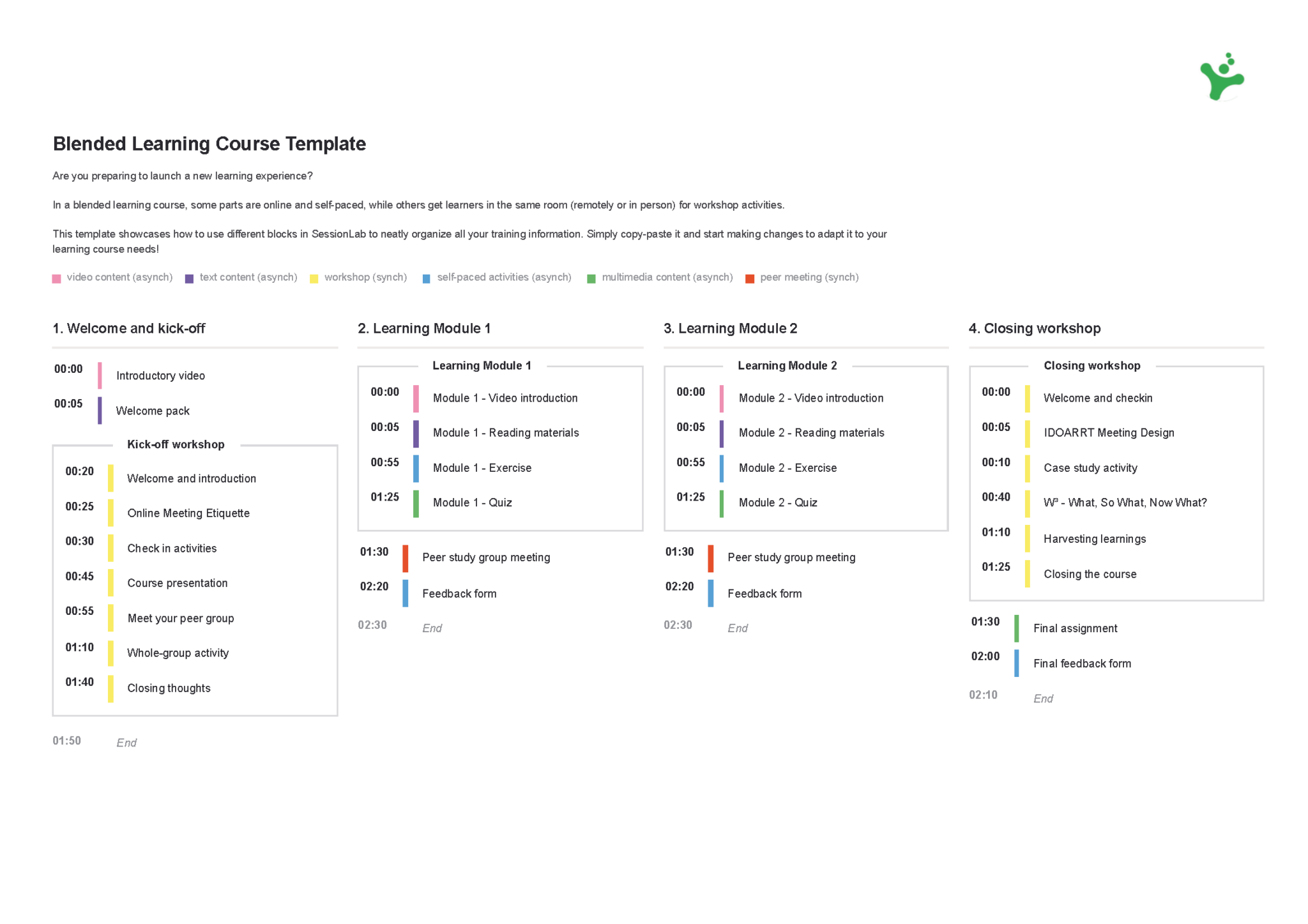
Consistent formatting and visual cues pay dividends at scale. Many L&D teams use colour-coding in SessionLab’s agenda to easily parse learning flow or deploy coloured text to signal different types of facilitator action.
General text hygiene is also important. Use line breaks, checklists and rich-text formatting to make it easy to scan instructions and simple to understand. (A good editor or some light AI assistance can help here!)
SessionLab also allows teams to customize printouts and choose what columns are visible. You may have a detailed agenda in SessionLab but prefer a simple overview to take into the room with you.
Whatever system you use, document it in the guide and apply it consistently across every session. When every guide follows the same format, facilitators stop spending mental energy parsing the design and can instead focus on delivering a great session.
Always explain the why
As a facilitator, many questions emerge for me when it comes to leading a session. These range from big questions like “why is this important for the business and for participants?” all the way to “why are the activities structured in this way?”
Understanding the why of each of these element can ensure that facilitators know the purpose and relative importance of every activity in a training session. This makes it easier to emphasize key points and make intelligent facilitation decisions in the moment.
This is also vital information the trainer can use when answering similar questions from participants. “Because management said so” is not a good answer when a trainee asks why they were asked to attend.
Use the brief page to answer the big why questions: outlining learning objectives and key metrics can go along way to filling in the gap though you may also wish to include a little background context on the trigger point for this training.
A brief facilitator note at specific points can go a long way. For example, “This activity is designed to surface assumptions before the model is introduced; resist the temptation to skip it and try to hear from at least 3 people”.
With a more experienced training team and facilitation training or certification systems in place, you can go more lightly on some of these details though I find them useful to include, even if its just to help me design better sessions. I quite often include an additional column for such information in the Session Planner so its up to each trainer if they want to see it.
Include a dedicated prep section
Even experienced facilitators benefit from structured preparation time before delivering a programme. At a minimum, include a facilitator prep checklist in your guide. This can include everything from logistic reminders, printout and material gathering and admin tasks. All of these help reduce mental load of trainers and can help ensure other items are not missed.
When working at scale, this checklist also serves as a guardrail for things like attendance, proper documentation and feedback collection. The more you can make these things habit for every training session, the less your facilitation managers have to chase or do extra work later.
Think carefully about the right level of scripting
Too much script and facilitators sound robotic. Too little and you introduce inconsistency and risk trainees not receiving a key message. For most enterprise companies, a middle path works best: detailed enough to ensure key content is covered consistently, flexible enough that facilitators can bring their own personality and adapt to their audience.
Where scripting really matters is anything compliance-sensitive, legally governed, or where specific language has been chosen deliberately. In those cases, it can help to flag it clearly: “Please use this framing verbatim” and briefly explain why.
For some organizations, it can also work to have zero scripting and simply have a list of key points that must be covered for compliance or business reasons. Whatever path you take, ensure your facilitator guide is explicit on your expectations. Trainers should not need to guess about what they can or cannot do and training managers should not receive last-minute calls about the design.

Translation is good, localisation is better
If your programme is delivered across different countries or regions, chances are they may be delivered in different languages or by trainers with a different first-language.
Providing translated materials can make a big difference for local teams, and its easier than ever to translate training guides with SessionLab’s AI assistant. For some companies, localizing facilitator guides ensures even higher engagement and training quality.
For example, a localized guide considers whether the activities, examples, and facilitation approach actually land in that environment and may be tweaked for local cultural contexts.
The most robust approach is to involve local facilitators or L&D partners in the design process, not just to translate, but to review and adapt during creation. If teams are lightly localizing completed materials, be sure to build clear guidance into the guide on what must stay consistent and what can be adapted.
Maintain version control, but iterate
One of the most common problems with facilitator guides in large training functions is version chaos. A facilitator downloads a guide, improves it based on their delivery experience, and shares it with a colleague. Now there are two versions in circulation.
Maintaining a single source of truth and organizing all your facilitator guides in SessionLab is a great way to solve this issue. Every facilitator and trainer can find what they need, but you don’t need to worry about dozens of the same guide out there.
But what about improving the guide? Collect feedback from trainers and facilitators delivering your materials as well as from participants. Not only does this encourage personal reflection and development, but it ensures you receive key input to facilitate continuous improvement of your training programs.
Establish a clear process for how this feedback gets incorporated into the master version and communicate changes to your team when needed.
Standardize your designs
Standardization is helpful to everyone in involved in the facilitator guide process. From a design angle, it means you can focus on creating a great flow and engaging content, rather than wondering how to present information or how to structure the guide.
Standardization also makes the content of your training guides easier to understand and speeds up any editorial back-and-forth. In my experience, it makes it so much easier to spot when something needs further attention. It also makes it a trainers job simpler, ensuring they can focus on the
In practice, this means creating reusable templates and having design guidelines for your training designers to follow. If you want to become best-in-class, you may also implement some training and/or certification for your facilitation and training team that can help everyone get on the same page.

Include a session completion and feedback workflow
What happens after the session matters just as much as what happens during it. Include clear guidance on how facilitators should close the session, collect participant feedback, and record that the session was completed.
In SessionLab, this also means adding feedback forms to the facilitator guide that every trainer can easily share with participants. By using the same forms consistently, this makes it easier to evidence engagement and outcomes with data integrity.
When facilitators consistently complete a brief session record, you build the evidence base to identify what’s working and where the programme needs attention.
How SessionLab helps you build better facilitator guides
There’s a particular kind of stress that comes with handing a training programme over to someone else for the first time. You’ve built something you’re proud of. You know every activity, every transition, every moment where the energy in the room shifts. And now someone else is walking into that room — and you won’t be there.
A great facilitator guide is what makes that handover feel safe for everyone involved. For the trainer stepping in, it’s the difference between walking in with confidence and spending the night before quietly panicking.
For the programme owner, it’s the difference between trusting that the session will deliver on desired outcomes and simply hoping for the best. And for the organisation, it’s what separates a training programme that scales from one that stays forever dependent on a single person.
Building a facilitator guide that genuinely delivers that value for everyone involved takes time. The right tool removes a lot of the friction and helps the process scale up effectively.
SessionLab is built for exactly this kind of work. Rather than assembling a training guide across a patchwork of Word docs, PDFs, and shared drives, everything lives in one place. The session brief, the agenda, the participant materials, the feedback forms, and the post-session data are all exactly where you and your team need them.
Want to see what an example training guide? Explore this facilitator guide template to see how you might structure your next instructor-led-training program and adapt it to your needs.

James Smart is Head of Content at SessionLab. He’s also a creative facilitator who has run workshops and designed courses for establishments like the National Centre for Writing, UK. He especially enjoys working with young people and empowering others in their creative practice.



Leave a Comment