10 best training management systems for instructor-led training

Running a single instructor-led training session is relatively straightforward. But what happens when you're responsible for 50 sessions across different teams, locations, and timezones?
The right training management system (TMS) can make a big difference when it comes to coordinating instructor availability, preparing materials for different audiences, and trying to keep track of what's happening across your program.
In this guide, we'll explore ten training tools you can use when managing instructor-led training. We'll explore what each TMS is good at, and how to choose the right one for your program.
What is a training management system?
Training management systems (TMS) help organizations plan, organize, and coordinate their training programs.
For instructor-led training, this typically includes scheduling sessions, assigning instructors, managing resources, tracking delivery, and reporting on training activity. In tools like SessionLab, this also extends to the design and organization of training materials like facilitator guides and training program agendas.
It’s useful to distinguish between a training management system (TMS) and a learning management system (LMS).
An LMS is primarily designed to manage learning content and learner progress. It helps organizations enroll participants, distribute materials, administer assessments, and track course completions.
A TMS focuses more on the operational side of training: making sure the right people, resources, and processes are in place to deliver sessions successfully. While an LMS is typically used for eLearning and self-paced materials, TMS’ are most often used for live, instructor-led programs.
The best training management tools for instructor-led training
Different training programs need different kinds of support. In this guide, we’re looking at training management software that is especially useful for teams who are designing and managing live training delivered by trainers or facilitators.
Typical examples include leadership development programs, employee onboarding and soft skills training where participants benefit from hands-on activities, group discussion and immediate feedback from an experienced facilitator.
Here are ten tools worth considering if you’re running instructor-led-training, each with a particular strength or focus.
| Tool | Best for |
|---|---|
| SessionLab | Designing and managing instructor-led training programs |
| Arlo | Selling and administering public training courses |
| Administrate | Complex training operations |
| ReadyTech | Hands-on technical and IT training |
| Class | Interactive virtual instructor-led training |
| accessplanit | Training administration and compliance workflows |
| Training Orchestra | Training budgets and resource utilization |
| Absorb LMS | Automated learning paths |
| TalentLMS | Small businesses combining online and live training |
| Docebo | Managing training across multiple audiences |
SessionLab
Best for: Internal L&D teams and training managers designing and managing instructor-led-training programs.
Managing an internal training program means juggling a lot more than schedules. You might be coordinating 30 facilitators across different locations, responding to new requests, preparing new training programs, and collecting feedback from completed sessions.
The challenge for L&D teams is keeping all of this work connected, rather than spread across emails, separate drives, and different software tools.
On top of this, training mangers need to oversee capacity, ensure training quality remains high and that delivered programs actually have impact. Without a system, this can quickly become a massive operational burden.
SessionLab combines facilitator coordination, collaborative session design, and delivery management in one place. This helps L&D teams and trainer managers to easily coordinate instructor-led training all the way from initial request to a completed session.
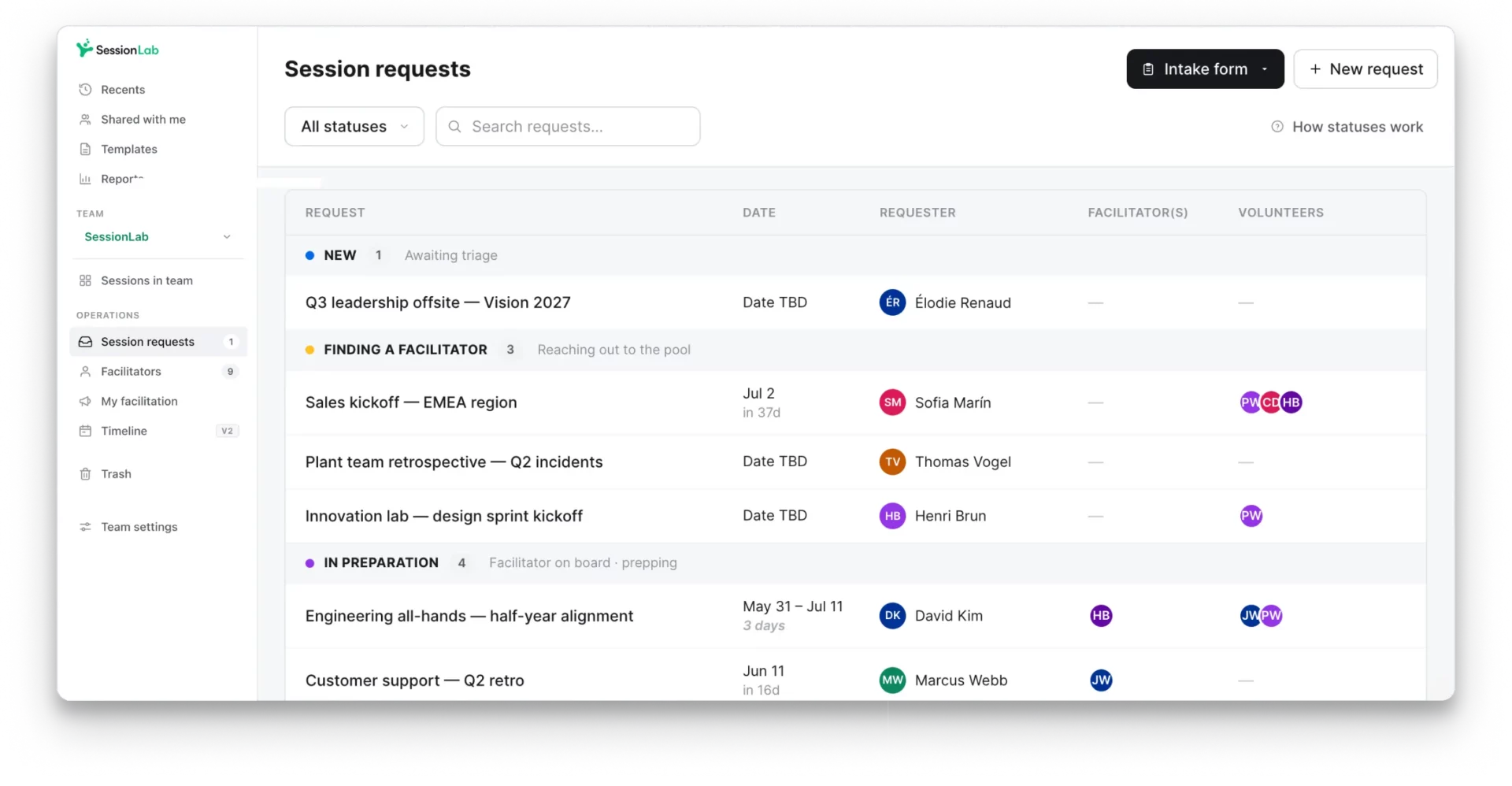
SessionLab key features
- Trainer directories and job matching by skills, qualifications, and availability.
- Centralized request management with design and delivery workflow.
- Facilitator assignment, invitations, and staffing workflows.
- Collaborative agenda planner with automatic timing calculation and powerful AI assistance.
- Repository of reusable templates, workflows, and facilitator guides in one place.
- Create session briefs, needs assessments, slide decks and other training materials.
- Feedback forms and completion tracking.
- Delivery reporting and facilitator performance insights.
Why choose SessionLab?
SessionLab is particularly well suited to organizations that need to design, maintain and scale instructor-led training. It’s the single place where your team can create high-quality facilitator guides and coordinate the trainers, schedules and feedback behind a successful training program.
While many LMS’ and TMS’ are effective at the operational side of training management, SessionLab also features robust design tools that make it easy for trainers to adjust existing materials, collaborate with SMEs and ensure best practices are followed for every training session in an organization.
By connecting training operations and design in one workflow, L&D teams using SessionLab can optimize their processes and improve the quality of instructor-led training at scale.
Read this story to see how Norconsult use SessionLab to design, adapt and run leadership development programs across multiple sites.
SessionLab helps us to create alignment quicker. If we can save time, we can deliver more effective services. Because of SessionLab, the impact of what we deliver in the end—the quality of the training or the quality of the workshop—is going to be better. We can focus on the process and the people.
Christian Valentiner, HR Development Specialist, Norconsult
Why SessionLab might not be right for you
- Commercial course administration: Organizations selling public training courses may need additional tools for payments and customer management.
- Self-paced and technical training: SessionLab is best for conducting facilitated in-person training that is experiential in nature. Teams requiring extensive eLearning or technical training may benefit from pairing SessionLab with an LMS or specialist delivery platform.

Arlo
Best for: Commercial training providers delivering public courses and scheduled training programs.
Arlo is a training management system built for organizations that sell and deliver training courses.
It combines scheduling, online registration, payments, and customer management, helping providers administer their training programs without switching between separate booking systems, spreadsheets, and CRM tools.
For a training business running a public course catalog, this means managing much of the customer journey, from initial registration to attendance, in one place.
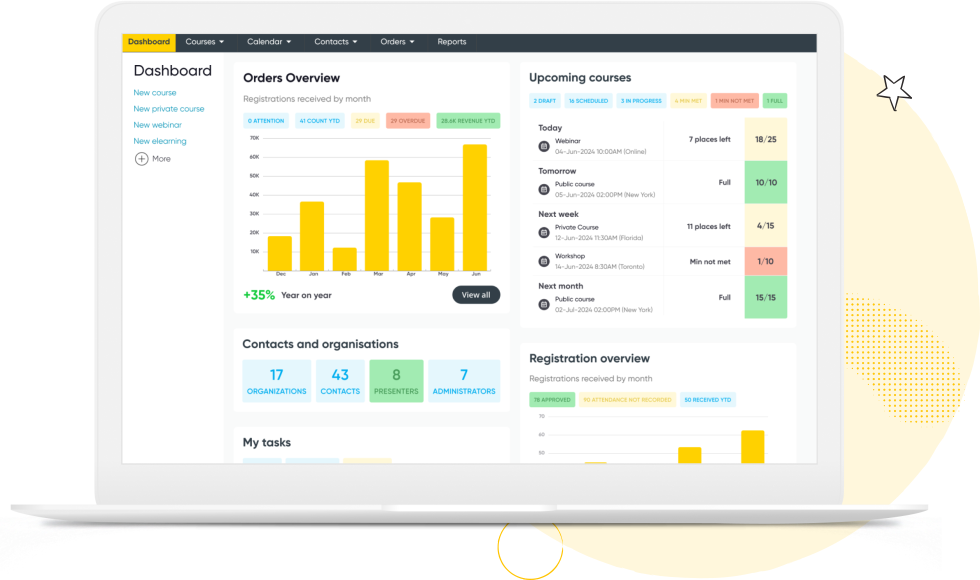
Arlo key features:
- Course scheduling for in-person, online, and blended training.
- Online registration, payments, and invoicing.
- Built-in CRM for managing customers.
- Automated learner communications and reminders.
- Learning management functionality for blended programs.
- Reporting on course activity and commercial performance.
Why choose Arlo?
Arlo is particularly useful when training courses are products that customers purchase.
It simplifies the process from someone discovering a course to registering, paying, and attending. For organizations running a public course catalog, this can save substantial administration time.
Why Arlo might not be right for you
- Less relevant for internal training: Arlo’s course sales, registration, and payment features may be unnecessary for organizations primarily delivering internal workshops.
- Different focus from bespoke facilitation: Teams managing customized workshop requests and collaborative session design may prefer a platform more closely aligned with those workflows.
Administrate
Best for: Large organizations managing high volumes of instructor-led training with an emphasis on compliance and risk management
When you’re coordinating hundreds of sessions across multiple regions, managing instructor availability, classrooms, equipment, and compliance requirements can become a significant operational challenge.
Administrate is an enterprise training management system designed for this kind of complexity.
Its scheduling, resource management, and automation features help training teams organize large-scale delivery and reduce manual coordination.
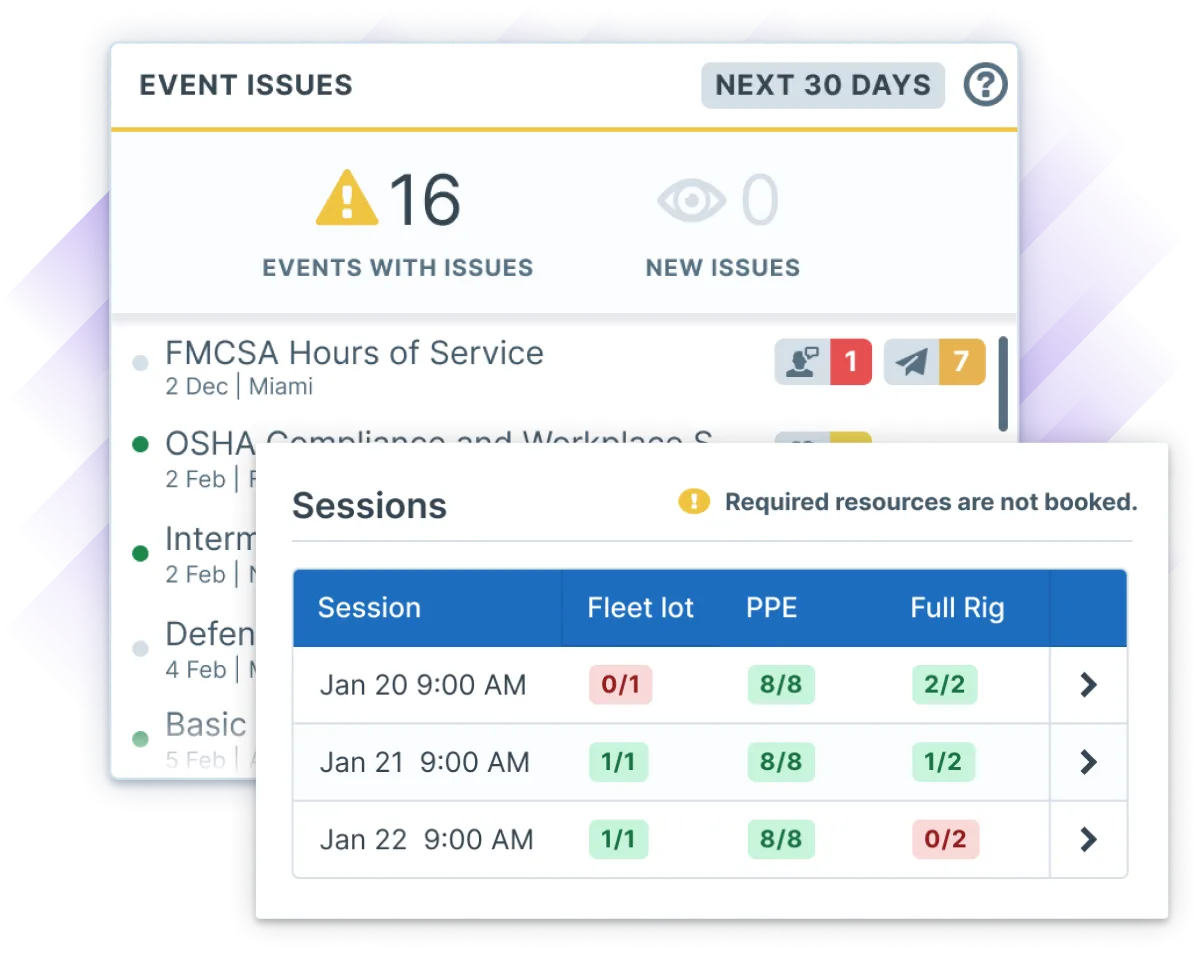
Administrate key features
- Centralized scheduling of instructor-led training.
- Instructor, venue, and equipment resource management.
- Scheduling conflict detection and alerts.
- Standardized course administration workflows.
- Automated training communications.
- Operational reporting and enterprise integrations.
Why choose Administrate?
Administrate is particularly well suited to organizations where coordinating training resources while ensuring compliance is a major challenge.
It can help teams manage large schedules, reduce administrative work, and maintain oversight of delivery.
Why Administrate might not be right for you
- Emphasis on operations: session design features are thin. Teams who need to adjust designs and collaboratively create content with SMEs would need supplementary tools.
- More than many teams need: Its enterprise-level scheduling and administration capabilities may be more extensive (and expensive) than necessary for many teams.
ReadyTech
Best for: IT training providers and organizations delivering practical technical courses.
ReadyTech specializes in technical training delivery, providing virtual classrooms and cloud-based labs where participants can practice using software and systems.
Rather than asking learners to install applications on their own computers, instructors can provide dedicated training environments and assist participants during practical exercises.
It’s particularly useful for IT certification, software training, and other technical courses where hands-on learning is essential.

ReadyTeach key features
- Cloud-based virtual labs for technical exercises.
- Virtual classrooms for live instruction.
- Instructor visibility into learner activity.
- Tools for assisting participants during practical exercises.
- Browser-based access to training environments.
- Support for self-paced and instructor-led technical training.
Why choose ReadyTech?
ReadyTech is particularly valuable when hands-on practice is central to the learning experience.
Rather than spending time helping every participant install software, instructors can provide a consistent environment where learners can get straight into practical exercises.
Why ReadyTech might not be right for you
- Specialized in technical training: Virtual labs may offer little value for programs focused on leadership development, onboarding, or facilitated workshops.
- ReadyTech’s instructor interface showing virtual training environments.: Organizations may need additional tools for training requests, facilitator assignments, and program coordination.
Class
Best for: Organizations delivering live, interactive training online.
Class is a virtual classroom platform built to work with Zoom and Microsoft Teams, with tools designed to support online learning experiences.
Its focus is on helping instructors manage the live virtual classroom, rather than the broader administration of training programs or in-person sessions.
In Class, you’ll engagement tools like quizzes and tests alongside advanced breakout support and integration with your LMS.

Class key features
- Virtual classrooms using Zoom and Microsoft Teams.
- Tools for managing breakout activities.
- Reusable classroom setups and course templates.
- Learner engagement and participation tools.
- Interactive assessments and recordings.
- Engagement analytics and LMS integrations.
Why choose Class?
Class is particularly useful for organizations running virtual classrooms and training programs who want something more robust than Zoom or Teams, but are still tied to those ecosystems.
It provides a useful dashboard for online instructors that can help create more engaging and structured virtual learning.
Why Class might not be right for you
- Designed for virtual training: Its virtual classroom features are less relevant to organizations who deliver in-person sessions or blended learning.
- Focused on delivery: Think of Class as Zoom 2.0. Teams will need need complementary software to coordinate training requests, trainer assignments, agenda design, and wider program administration.
accessplanit
Best for: Training providers managing recurring courses, certifications, and complex administrative processes.
accessplanit helps training providers manage the administrative work surrounding course delivery, from scheduling and bookings to automated communications and certification.
It’s particularly relevant for organizations delivering recurring or mandatory training, such as health and safety courses, where accurate records, refresher training, and certification are important.

accessplanit key features
- Course scheduling and resource management.
- Trainer, venue, and equipment availability.
- Booking and registration management.
- Automated administrative communications.
- Certificate generation and compliance records.
- Customer, learner, and trainer portals.
- Reporting on training activity and resource utilization.
Why choose accessplanit?
accessplanit is useful for providers running a large catalog of regularly scheduled courses, particularly where certificates, learner records, and recurring training are important.
Automating tasks such as confirmations, reminders, and certification can reduce the administrative workload.
Why accessplanit might not be right for you
- Administration-focused: Its course management, booking, and certification features may be less relevant to teams delivering a combination of training and bespoke workshops and other session types.
- Inflexible workflows and reports: Some users have found working with multiple data sources in reports difficulty, while others have found configuring surveys and registrations forms less flexible than expected.
- No authoring or agenda creation tools: Training design and material creation needs to live elsewhere.
Training Orchestra
Best for: Enterprise training teams requiring detailed control over training costs and resources.
Training Orchestra is a specialist training management system focused on scheduling, resource optimization, and financial management for ILT and VILT programs.
Alongside coordinating instructors, classrooms, and external providers, it helps organizations track training costs and understand how effectively their resources are being used.
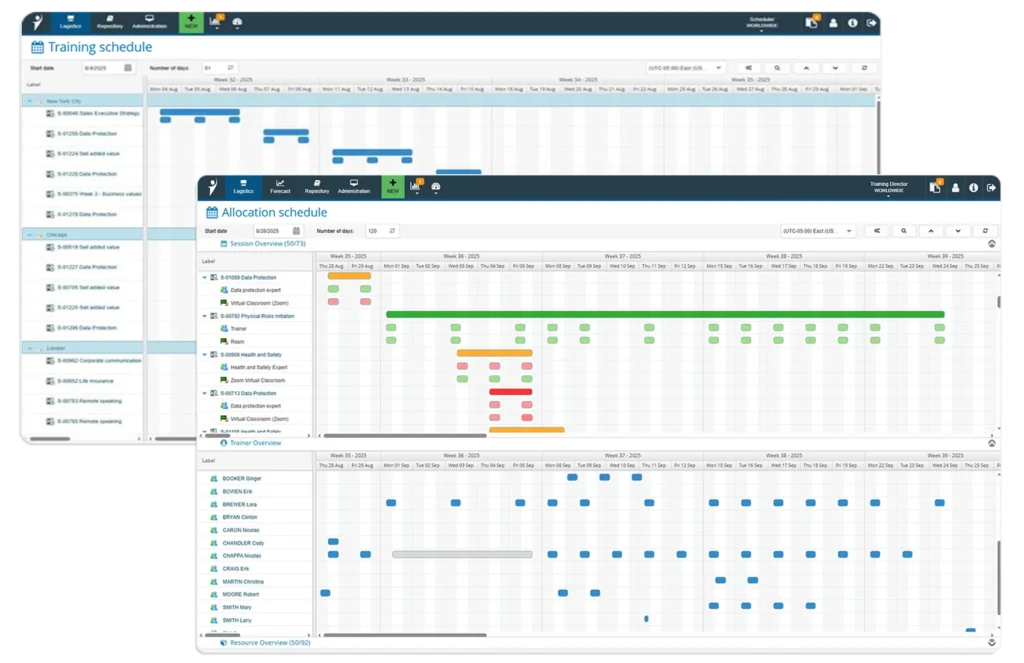
Training Orchestra key features
- Instructor and resource management.
- Training cost and budget tracking.
- Administrative task management.
- Instructor assignments and collaboration.
- Reporting on resource utilization.
- Integrations with learning systems.
Why choose Training Orchestra?
Training Orchestra is worth considering when managing the financial and logistical complexity of training is a priority.
For example, an enterprise L&D team can use operational and cost information to identify underutilized resources, monitor spending, and make decisions about future delivery.
Why Training Orchestra might not be right for you
- Enterprise operational focus: Advanced cost tracking and resource optimization is the focus. For smaller teams, the cost (quote-based) and overhead of learning the tool may be a downside.
- Pure TMS: does not contain LMS-like features or authoring tools, so expect integrations, implementation projects and additional tooling.
Absorb LMS
Best for: Organizations managing employee learning, compliance training, and professional development.
Absorb LMS is an enterprise learning management system designed to help organizations deliver online courses, automate learner enrollment, and track training progress.
Its strengths lie in managing structured learning programs. Administrators can create learning paths, automatically assign courses based on enrollment rules, manage assessments and certifications, and monitor learner completion.

Absorb LMS Key features
- Automated course enrollment and learning assignments.
- Structured learning paths and curricula.
- Online courses, assessments, and certification management.
- Learner progress, completion, and compliance reporting.
- Training administration for employees, customers, and partners.
Why choose Absorb LMS?
Absorb is particularly useful for organizations delivering structured learning at scale, especially when much of that learning happens through online courses.
For example, an enterprise onboarding program might require employees to complete a sequence of compliance modules, role-specific training, and assessments.
Absorb can automate course assignments, organize learning paths, and track progress without administrators having to manage every enrollment manually.
Why Absorb LMS might not be right for you
- Instructor-led training management can be cumbersome: Some users report that enrolling in live training involves too many steps; managing learners in live sessions is not this platform’s strong suit.
- Reporting customization and admin overhead can be frustrating: Although Absorb offers extensive reporting, some users find its standard reports difficult to customize. Reviewers have reported needing additional reporting functionality, with more advanced analytics available through paid add-ons.
TalentLMS
Best for: Small and growing organizations that need a straightforward way to combine online and live training
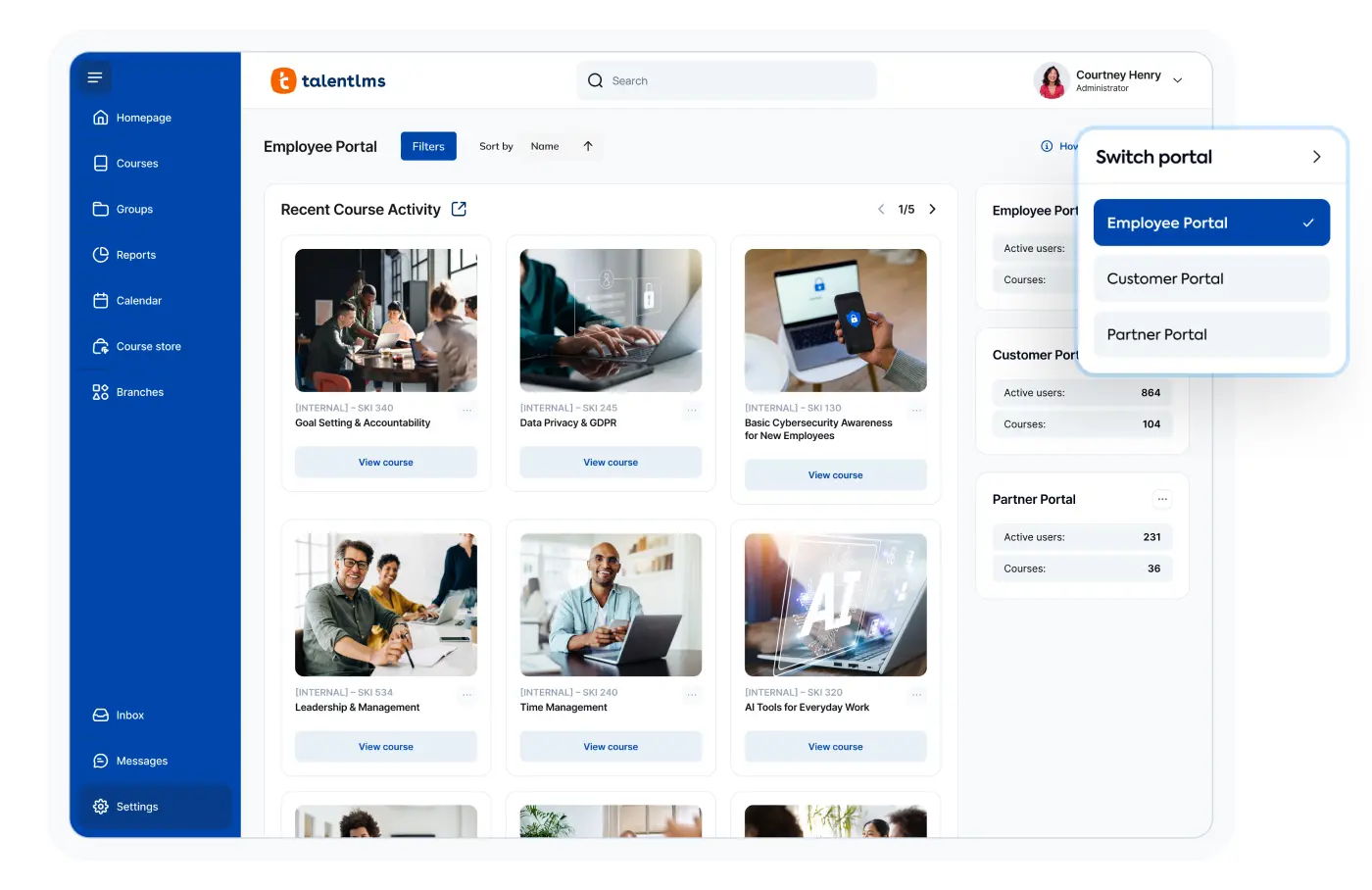
TalentLMS combines self-paced online learning with instructor-led training, giving smaller organizations a way to manage both through one system.
For example, a company with 80 employees might use it to provide online onboarding modules, schedule occasional live workshops, and track employee progress without introducing a complex enterprise training platform.
TalentLMS key features
- Online course creation and learner management.
- Enrollment and training scheduling.
- Assessments and completion tracking.
- Learner groups and learning paths.
- Training reports and integrations.
Why choose TalentLMS?
TalentLMS can be a practical option for smaller organizations combining online learning with occasional live sessions.
For example, an onboarding program could include self-paced modules followed by a live workshop, with progress tracked through the same system.
Why TalentLMS might not be right for you
- Focused on learning administration: Its course-based approach may be less suitable for organizations coordinating large numbers of bespoke workshops and more flexible training interventions.
- Limited control over design and branding: Reviewers have reported restrictions when customizing learning portals and course layouts. Some users have also found the built-in editing tools frustrating, particularly when formatting more visually complex content.
Docebo
Best for: Enterprises delivering training to employees, customers, partners, and resellers through separate branded learning portals.
Docebo is an enterprise LMS that helps organizations manage training for different audiences from a single platform.
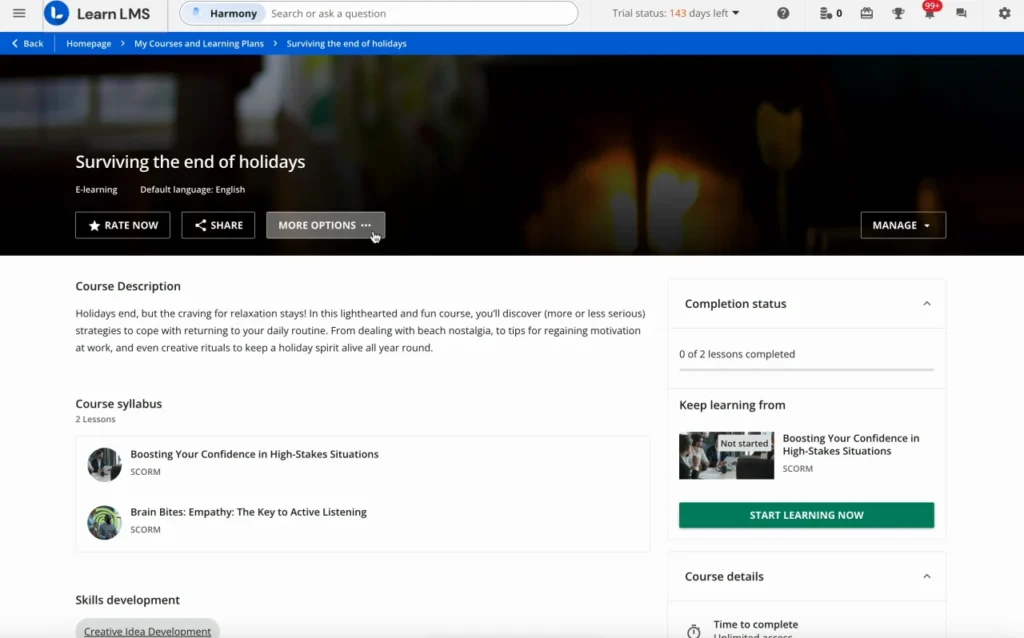
Its extended enterprise capabilities allow companies to create separate, branded learning portals for employees, customers, and partners, each with its own content, learning paths, and administrative permissions.
Docebo also includes AI-powered content creation, personalized learning, and instructor-led course management, though its primary focus is delivering and tracking structured learning programs.
Key features:
- Multiple branded learning portals for different audiences.
- Centralized administration across customer, partner, and employee training.
- Personalized learning paths and automated enrollments.
- AI-powered recommendations.
- Assessments, certifications, and learner progress tracking.
Why choose Docebo?
Docebo is particularly useful for large organizations that need to deliver different learning experiences to multiple audiences without maintaining separate LMS platforms.
For example, a software company could provide customer education, partner certification, and employee training through distinct branded portals, while managing everything centrally.
Why Docebo might not be right for you
- Setup and customization can be complex: Some users report a steep learning curve when configuring advanced workflows, particularly when managing multiple audiences and permissions. These advanced tools are often only necessary at large scale.
- Additional features can increase costs: Docebo is already an expensive tool, and reviewers have raised concerns about separately priced functionality, including advanced reporting and analytics.
Making instructor-led training programs easier to manage with SessionLab
As training programs grow, coordinating the work that goes into every session becomes more challenging.
More instructors, locations, and requests mean more schedules to manage, more materials to prepare, and more information to keep track of. Without a system, facilitator guides can quickly become out of date, learnings can get lost, and matching the right trainer to the right request can become a major time-sink.
The right training management software can reduce administrative load while also creating workflows that empower individual trainers to deliver greater impact and ensure learnings compound.
For organizations whose focus is on running high-quality instructor-led training at scale, SessionLab is a perfect partner. It is the only training management tool that covers the entire program workflow while also providing robust design tools for creating facilitators guides, workshops and training programs.
Watch this short video to see how to use SessionLab to scale instructor-led training or get in touch with our team to explore how we can help you deliver better outcomes and reduce admin overhead in your future training programs.


James Smart is Head of Content at SessionLab. He’s also a creative facilitator who has run workshops and designed courses for establishments like the National Centre for Writing, UK. He especially enjoys working with young people and empowering others in their creative practice.


Leave a Comment